Lær om HelseID
Grunnleggende
Her får du en kort oversikt over noen grunnleggende ord og uttrykk i HelseID.
I hver seksjon finner du lenke til relevant spesifikasjon.
Hva er HelseID?
HelseID tilbyr single sign-on brukerpålogging for klienter, maskin-til-maskin-autentisering – og sikring av tjenester i helse- og omsorgssektoren.
Ved hjelp av veletablerte sikkerhetsstandarder som OAuth 2.0 og OpenID Connect 1.0 , bidrar HelseID til tillit mellom ulike virksomheter i sektoren.
Med NHN og HelseID som tiltrodd tredjepart slipper virksomhetene å stole direkte på hverandre, og trenger ikke å utarbeide bilaterale avtaler på kryss og tvers i sektoren.
HelseID utsteder access tokens som gir tilgang til tjenester som Kjernejournal, Persontjenesten, og mange flere.
            graph TD;
                SFM & Kjernejournal & Persontjenesten & ... -- Tillit --- HelseID
Du kan lese mer om HelseID i de følgende avsnittene, og på nhn.no . Du kan også finne lenker til relevante sikkerhetsspesifikasjoner og ‑standarder.
La oss først gå gjennom det helt grunnleggende med klienter og API-er, også kalt tjenester.
Hva er en IdP?
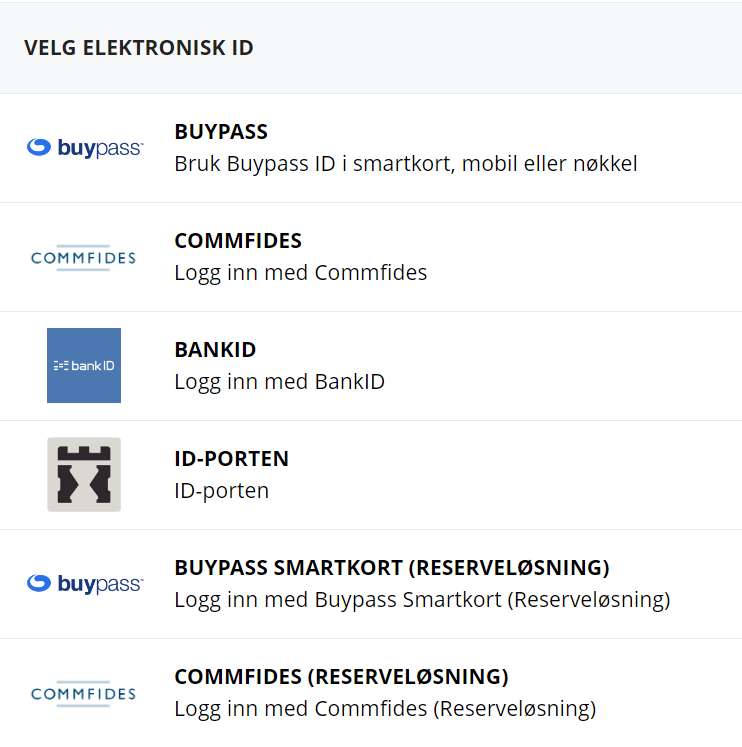
IdP står for Identity Provider, eller identitetstilbyder på norsk. Det er en tjeneste som kjenner til en digital identitet for ditt vedkommende. I HelseID-sammenheng er identiteten lik fødsels- eller d-nummeret ditt. En identitetstilbyder lar deg bevise at du kan bruke fødselsnummeret ditt i digitale sammenhenger.
Identitetstilbydere som BankID, Buypass og Commfides tilbyr autentisering på høyeste sikkerhetsnivå, mens for eksempel MinID "bare" tilbyr såkalt betydelig sikkerhetsnivå.
Les mer om ulike sikkerhetsnivåer hos Digitaliseringsdirektoratet
Hva er en klient?
En klient representerer en applikasjon som bruker HelseID til brukerpålogging og/eller konsumering av tjenester.
Klienten kan ha tilgang til ett eller flere API-scopes. Dette sier noe om hvilke tjenester klienten kan benytte seg av.
En HelseID-klient er helt enkelt en unik identifikator som er registrert i HelseID. Denne må være assosiert med en autentiseringsnøkkel, slik at det kun er innehaveren av nøkkelen som kan bruke klienten.
Dette kalles en konfidensiell klient, som er den eneste klienttypen HelseID tillater.
Multitenancy
En "vanlig" HelseID-klient kan bare representere én hovedenhet. En hovedenhet er en virksomhet på øverste nivå i Enhetsregisteret. En klient opprettet for et gitt legekontor kan kun representere dette legekontorets organisasjonsnummer overfor HelseID.
Dette kalles et single-tenant-mønster.
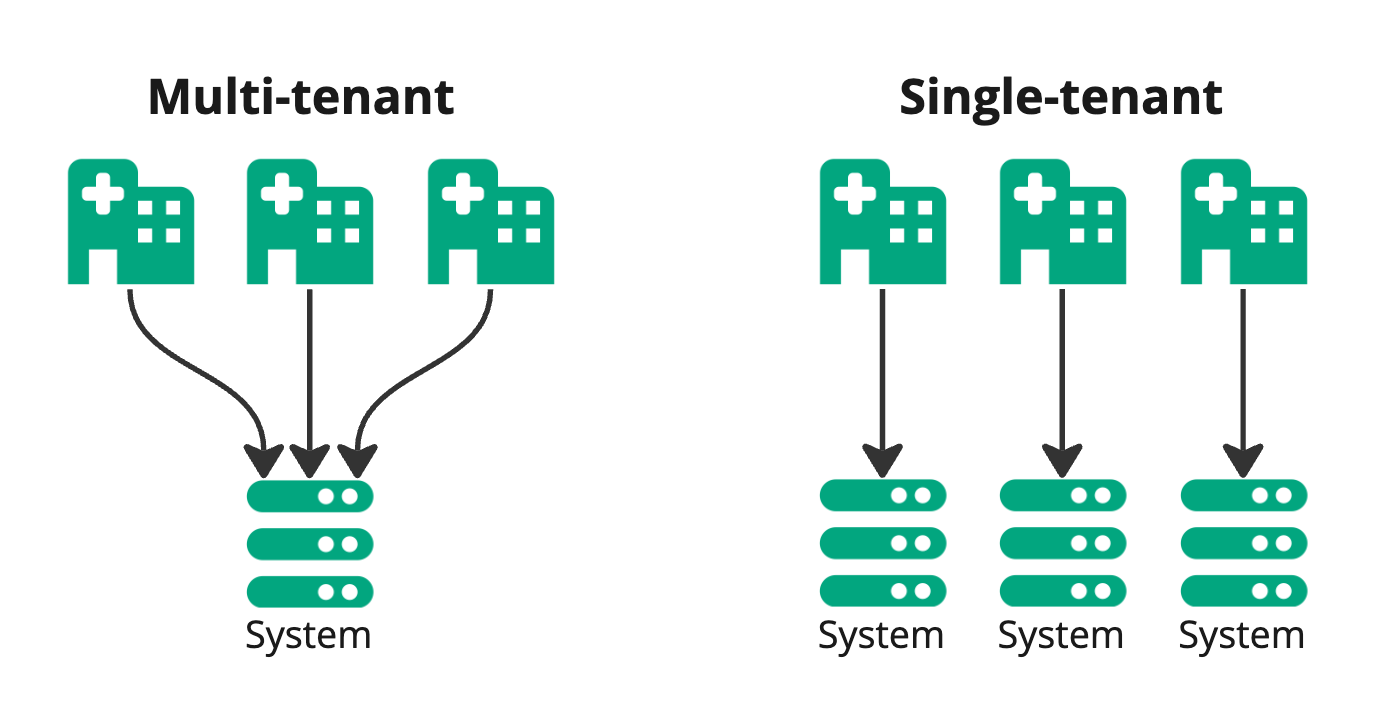
Hvis Helseplattformen skulle hatt én klient for Ålesund, og én for St. Olavs, ville det etter hvert blitt mange klienter å holde styr på.
Her kommer såkalt multitenancy inn i bildet. En multi-tenant-klient kan representere flere hovedenheter overfor HelseID.
For å få til dette må St. Olavs hospital og Ålesund sykehus gi fullmakt til Helseplattformen på helsenettet.no
Les mer om klientmønstre i HelseIDs dokumentasjon i utviklerportalen
Hva er et API?
API står for Application Programming Interface. Det er en applikasjon som er ment for å bli brukt av andre applikasjoner – ikke menneskelige brukere. Det kan også være en del av en applikasjon som også tilbyr et grafisk brukergrensesnitt.
Persontjenesten er et eksempel på en tjeneste som kun tilbyr et API, mens Kjernejournal og SFM er tjenester som tilbyr grafiske brukergrensesnitt i tillegg til API-er.
Et API kalles også ofte for en tjeneste, siden det passer bedre inn i et naturlig språk og i et større organisatorisk perspektiv.
API-er knytter sammen ulike datasystemer i såkalte integrasjoner.
Hva betyr scope?
Scopes kan brukes til flere ting, men la oss her holde oss til API-scopes. Enhver tjeneste (API) må definere minst ett scope, som er et unikt navn, for eksempel nhn:kjernejournal/api.
Et API-scope oppgis som verdien til claimet scope i access tokens.
En klient kan ha tilgang til ett eller flere API-scopes. Dette sier noe om hvilke tjenester klienten kan konsumere. Et scope kan også være begrenset til en del av en tjeneste.
Det er viktig å huske på at enhver tjeneste har sin egen tilgangskontroll, så det er ikke alltid tilstrekkelig å ha tilgang til et scope for å få tilgang til ønsket data. Men det er en forutsetning.
Man får tilgang til scopes ved å be om dem i Selvbetjening for HelseID. Enkelte scopes er åpent tilgjengelige. Andre krever godkjenning fra tjenesteleverandør, mens noen blir automatisk godkjent dersom tilhørende vilkår for bruk er signert. Dette ledes man gjennom i Selvbetjening for HelseID.
Hva er et claim?
Et claim er et informasjonselement som forekommer i ID-Tokens og access token.
Et claim kan for eksempel:
- oppgi fødselsnummeret eller navnet til pålogget sluttbruker
- beskrive sikkerhetsdetaljer vedrørende autentiseringen
- oppgi organisasjonsnummer for virksomheten klienten representerer
- inneholde data for tillitsrammeverket
- beskrive øvrige detaljer om klienten, virksomheten eller sluttbrukeren, og mer
Les mer om claims i HelseIDs dokumentasjon i utviklerportalen
Detaljer om claims finnes i spesifikasjonene for OpenID Connect Core 1.0 og JSON Web Token (JWT)
Sjekk kunnskapen din om det grunnleggende i HelseID
Tokens
Man kan se på tokens som essensielle datadokumenter for interaksjonen mellom HelseID, klienter og tjenester.
Med unntak av refresh tokens, er alle tokens fra HelseID på formatet JWT (Json Web Token)
En JWT er tredelt og består av en header, en payload og en signatur. Signaturen sikrer to ting:
- Innholdet i tokenet kan ikke endres uten at man finner ut av det
- Man kan verifisere hvem som har signert tokenet, nemlig HelseID
Du kan lese mer om de ulike token-typene i de følgende avsnittene, og få lenker til relevant spesifikasjon.
Diagrammet under viser sammenhengen mellom ID-tokens, access tokens og refresh tokens.
                sequenceDiagram
                    actor X as Sluttbruker
                    participant A as EPJ
                    participant B as HelseID
                    participant C as Kjernejournal (eksempel)

                    X ->> A: Ønsker å hente ut opplysninger
                    A -->> X: Omdirigerer til HelseID for innlogging
                    X ->> B: Logger inn via en identitetstilbyder som f.eks. BankID
                    A ->> B: Ber om ID-token, access token og refresh token
                    B -->> A: Ønskede tokens
                    A -->> A: Lagrer ID-token for eget bruk
                    A ->> C: Forespørsel om data vedlagt access token
                    C -->> C: Validerer access token
                    C -->> A: Ønsket data
                    A -->> A: Etter en viss tid utløper access tokenets gyldighet
                    A ->> B: Bruker refresh token for å be om nytt access token
                    B -->> A: Nytt access token
                    X ->> A: Logger ut
                    A ->> B: Legger ved ID-tokenet hvis HelseID skal omdirigere brukeren et sted etter utlogging
                    B -->> X: Sender brukeren f.eks. tilbake til EPJ-en
                    X ->> A: Ser bekreftelse på utlogging
Hva er et access token?
Et access token er et adgangsbevis som brukes for å få tilgang til noe, for eksempel en tjeneste som SFM eller Kjernejournal. Det inneholder claims som er av interesse for mottakeren.
Man kan spørre seg om hvordan man kan vite at et access token er utstedt av HelseID og ingen andre. Det gjør man ved å validere at tokenet er kryptografisk signert av HelseID.
Tokenet skal kun sendes videre til tjenesten man ønsker tilgang til. Det skal ikke sendes til andre tjenester. Om så, skal det avvises av disse andre tjenestene.
Et access token fra HelseID inneholder alltid informasjon om blant annet:
- Hvilken mottaker (typisk tjeneste) tokenet er ment for – også kalt audience
- Scopes, som her kan bety hvilke deler av tjenesten man skal ha tilgang til
- Hvilken HelseID-klient tokenet er utstedt til
- Hvem som har utstedt og kryptografisk signert tokenet
- Hvor lenge tokenet er gyldig
Tokenet kan inneholde informasjon om:
- Sluttbrukerens identitet
- Hvorvidt brukerautentiseringen er på høyeste nivå, som kun BankID, Buypass og Commfides kan tilby
- Øvrige påstander om sluttbrukeren eller HelseID-klienten
Hva er et ID-token?
Et ID-token er et bevis på at en sluttbruker har blitt identifisert og autentisert.
ID-tokenet er bare ment for applikasjonen sluttbrukeren har et direkte forhold til, for eksempel en elektronisk pasientjournal (EPJ) vedkommende bruker.
Det skal ikke sendes videre til andre applikasjoner eller tjenester.
Ved utlogging sendes ikke sluttbrukeren videre fra HelseID med mindre ID-tokenet legges ved utloggingsforespørselen.
ID-tokenet inneholder blant annet informasjon om:
- Hvem sluttbrukeren er
- Hvem som har utstedt og kryptografisk signert tokenet
- Hvor lenge tokenet er gyldig
Hva er et refresh token?
Et refresh token er knyttet til en brukerpålogging. Det brukes til å hente ut nye access tokens uten at sluttbrukeren skal omdirigeres til HelseID for ny pålogging.
Tokenet er typisk gyldig i flere timer, gjerne en drøy arbeidsdag slik at en sluttbruker ikke skal trenge å logge inn flere ganger daglig.
Når refresh tokenet ikke lenger er gyldig, må sluttbrukeren logge inn på nytt.
Et refresh token er en generert verdi som ikke gir mening for et menneske om man prøver å lese den.
Hva er DPoP?
Et "vanlig" access token er et såkalt bearer token, noe som innebærer at hvem som helst som er i besittelse av det kan bruke det. Om du finner en hundrelapp på bakken som ikke tilhører deg, kan du uproblematisk bruke den til å kjøpe deg noe du har lyst på. Det er ingen som stiller spørsmål hvis du bruker den til å kjøpe deg en softis i nærmeste kiosk. Slik er det altså også med et access token.
DPoP står for Demonstrating Proof of Possession, noe som gjør det mulig å bevise at man er rettmessig innehaver av et access token for å kunne bruke det.
DPoP går ut på at den som ber om et access token fra HelseID legger ved en offentlig nøkkel som HelseID knytter til tokenet. Dermed blir det ikke mulig å bruke tokenet uten at man samtidig legger ved et bevis på at man er i besittelse av korresponderende privatnøkkel.
Når access tokenet skal brukes, må det opprettes et kortlevd DPoP-bevis som kan brukes én gang og er begrenset til en sti hos tjenesten som er mottaker. Tjenesten verifiserer at DPoP-beviset er gyldig og i samsvar med nøkkelen access tokenet er bundet til.
            sequenceDiagram
                participant A as Klient
                participant B as HelseID
                participant C as Kjernejournal (eksempel)

                A ->> B: Ber om access token og legger ved offentlig nøkkel
                B -->> B: Knytter offentlig nøkkel til access token
                B -->> A: Access token bundet til offentlig nøkkel
                A -->> A: Lager DPoP-bevis
                A ->> C: Access token vedlagt DPoP-bevis
                C -->> C: Verifiserer DPoP-bevis
                A -->> A: Lager nytt DPoP-bevis for ny forespørsel
                A ->> C: Access token vedlagt nytt DPoP-bevis
                C -->> C: Verifiserer DPoP-bevis
Les mer om DPoP i HelseIDs dokumentasjon i utviklerportalen
Autentisering
Her får du en kort oversikt over ord og uttrykk i forbindelse med autentisering.
I hver seksjon finner du lenke til relevant spesifikasjon.
Client Credentials
Client Credentials brukes for å autentisere en klient overfor HelseID, maskin-til-maskin, uten at en menneskelig bruker er involvert.
I en slik sammenheng henter man ut access tokens. ID-tokens har med en menneskelig bruker å gjøre, og er ikke relevant. Refresh tokens er knyttet til en brukerpålogging og er ikke nødvendig eller relevant i et maskin-til-maskin-scenario.
Les om Token-endepunktet i HelseIDs dokumentasjon i utviklerportalen
Detaljer om Client Credentials finnes i spesifikasjon RFC 6749
Authorization Code Flow
Authorization Code Flow er en mekanisme som brukes for brukerpålogging.
Avhengig av innstillinger og behov, kan klienten ved fullført brukerpålogging hente ut et ID-token, et access token og et refresh token fra HelseID.
Må ses i sammenheng med PKCE, PAR og DPoP.
Les om Authorize-endepunktet i HelseIDs dokumentasjon i utviklerportalen
Detaljer om Authorization Code Flow finnes i spesifikasjonen for OpenID Connect Core 1.0
Hva er PKCE?
PKCE står for Proof Key for Code Exchange, uttales "pixi", og er et supplement til Authorization Code Flow for å øke sikkerheten.
Etter fullført brukerpålogging mottar klienten en autorisasjonskode fra HelseID. Denne skal brukes til å hente ut tokens, f.eks. et access token.
Uten PKCE kan hvem som helst som får tak i autorisasjonskoden bruke den. Derfor krever HelseID at man må bruke PKCE for å bevise at man er rettmessig innehaver av autorisasjonskoden.
Hva er PAR?
PAR (Pushed Authorization Requests) brukes for å redusere datamengden som sendes via nettleseren ved brukerpålogging.
Klienten må sende data til HelseID via et tjenestekall før sluttbrukeren omdirigeres til innlogging. Hensikten er å forbedre sikkerheten ved å hindre en angriper i å kunne se parametre i nettleseren, samt potensielt kunne modifisere dem.
Ved å flytte parametre fra front- til bakkanalen får man også en kortere url i nettleseren. Uten PAR kan denne i noen tilfeller bli så lang at man får problemer med begrensninger hos noen nettlesere eller mottakere.
Les om PAR-endepunktet i HelseIDs dokumentasjon i utviklerportalen
Resource Indicators
En klient skal bruke separate access tokens for API-ene A og B. Ved brukerpålogging kan klienten be om et access token for API A. Men når klienten trenger et access token for API B, må sluttbrukeren omdirigeres tilbake til HelseID. Dette er ikke sømløst, og kan oppleves upraktisk.
Resource Indicators er en mekanisme som lar en klient bruke flere API-er på en sømløs måte for sluttbrukeren.
Resource Indicators tillater klienten å assosiere scopes med separate ressurser, der hvert API er en ressurs. Da kan klienten bruke et refresh token til å hente ut separate access tokens per API, uten at sluttbrukeren merker noe til det.
Les mer om Resource Indicators i HelseIDs dokumentasjon i utviklerportalen
Detaljer om Resource Indicators finnes i spesifikasjon RFC 8707
Token Exchange
Dersom tjeneste A ønsker å konsumere tjeneste B, kan client credentials brukes overfor HelseID for å få til det.
Det vil føre til en maskin-til-maskin-relasjon mellom tjeneste A og B uten at en sluttbruker er representert.
La oss se for oss et scenario der en sluttbruker er logget inn i en EPJ via HelseID. EPJ-en kaller tjeneste A, som videre kaller tjeneste B. Sistnevnte tjeneste ønsker informasjon hvem som egentlig står bak forespørselen, nemlig den menneskelige sluttbrukeren. Årsaken kan for eksempel være behov for loggføring eller tilgangsstyring.
Da trengs det noe mer avansert enn client credentials; nemlig mekanismen Token Exchange. Når tjeneste A mottar et access token fra EPJ-en, vil dette tokenet inneholde informasjon om sluttbrukeren hvis tjeneste A krever det. Dette tokenet kan imidlertid ikke brukes direkte overfor tjeneste B, fordi det er ment for tjeneste A.
Token Exchange tillater tjeneste A å veksle inn tokenet overfor HelseID, og få tilbake et access token ment for tjeneste B. Dette nye tokenet vil inneholde informasjon om sluttbrukeren tjeneste A opptrer på vegne av.
Les mer om Token Exchange i HelseIDs dokumentasjon i utviklerportalen
Retningslinjer for valg av klienttype
Som systemleverandør skal dere bidra til at integrasjonen overfor HelseID ikke medfører unødvendig kompleksitet overfor brukerne av programvaren.
Ved kodegjennomgang av et nytt system i HelseID, vil vi ikke godta at dere har valgt en løsning som er lettvint for dere, men teknisk utfordrende for brukerne.
Dere skal ikke overføre kompleksiteten til brukerne deres. Dette vil føre til forsinkelser i bruken av systemet, og videre bruken av tjenestene som sikres av HelseID. I tillegg er det en sikkerhetsrisiko at brukerne eksempelvis må håndtere kryptografiske nøkler selv.
Derfor har vi utarbeidet noen klare retningslinjer for hvordan integrasjonen mot HelseID skal være.
Skal systemet brukes av flere forskjellige virksomheter?
Dersom systemet deres skal representere flere ulike hovedenheter i Enhetsregisteret overfor HelseID, skal dere i utgangspunktet gå for en multi-tenant-løsning. Dette er vanligvis en sentralisert webapplikasjon der dere har kontroll på hvilken virksomhet en sluttbruker representerer. Helseplattformen er et eksempel på et slikt system.
Hvis dere har en tykklient som må installeres ute hos brukerstedene må dere bruke en klientmal, og programmatisk opprette separate single-tenant-klienter for konsumentene deres via API-et vårt
Skal systemet brukes av kun én virksomhet?
Velg single-tenant. Helsenorge er et eksempel på et slikt system. De skal kun representere Norsk helsenett overfor HelseID og tilknyttede tjenester.
Onboardingsguide for leverandører
Når man har fått opprettet et klientsystem i produksjon, så er det på tide å få onboardet sine kunder til systemet. For å få til dette på en måte som er enkel for både dere og deres kunder anbefaler vi at dere setter dere inn i de forskjellige alternativene HelseID tilbyr.
For systemleverandører med multitenant-løsning
For systemleverandører med multitenant-løsning , må kunden deres gir dere fullmakt på helsenettet.no
For systemleverandører med tykklienter
En tykklient er en applikasjon med programvare som kjører lokalt på sluttbrukerens datamaskin, eller lokalt installert hos kunden/helsevirksomheten. En slik applikasjon forutsetter en HelseID-klient per helsevirksomhet.
Det kan være krevende for ikke-tekniske brukere å sette opp HelseID-klienter, og derfor så legger HelseID Selvbetjening opp til at dere som leverandør tar styring og skjermer deres kunder og brukere fra tekniske detaljer, ved hjelp av vårt API..
For å opprette klienter på vegne av din kunde så benyttes vårt Selvbetjening API for et helautomatisk oppsett.
For enkelhets skyld omtales en kunde som en fastlege, og et system/fagapplikasjon som EPJ. Dette er eksempler.
Helautomatisering via API
Kompleksitet rundt å sette opp klienter blir håndtert "under panseret" i EPJ-en, slik at fastlegen kun trenger å bekrefte oppsettet i Selvbetjening for HelseID.
Personen hos helsevirksomheten som skal bekrefte konfigurasjonen må være daglig leder eller få delegert rettigheten "Knytte et fagsystem som bruker HelseID til en helsevirksomhet" via Altinn. Det eksisterer funksjonalitet i HelseID Selvbetjening som kan assitere brukere i å be om riktig rettighet.
EPJ-en vil automatisk håndtere oppdatering av nøkkelpar ved utløp av gyldighet.
Selvbetjening på vegne av fullmaktsgivere
Helsevirksomheter (for eksempel legekontor) kan gi sin leverandør fullmakt til å administrere HelseID-klienter på deres vegne, i stedet for å gjøre det selv. Dette er særlig aktuelt for leverandører som ikke bruker multi-tenancy, hvor hver kunde trenger sin egen HelseID-klient. Fullmakten gis av helsevirksomheten på helsenettet.no
Når en virksomhet har gitt dere fullmakt og dere har skrudd på "selvbetjening på vegne av fullmaktsgivere", vil virksomheten dukke opp i listen over hvem du kan representere. Dere kan da opprette og redigere klienter basert på klientmaler på deres vegne. Dere kan derimot ikke opprette frittstående, tilpassede klienter for dem.
Personen som skal administrere disse klientene hos leverandøren må ha rettigheten "Knytte et fagsystem som bruker HelseID til en helsevirksomhet".
Les veiledningen for delegering fra virksomhet til virksomhet på utviklerportalen
Implementasjonsguide for klienter
Når du har opprettet en klient, og skal implementere en integrasjon overfor HelseID, er det nødvendig å forholde seg til sikkerhetsprofilen for HelseID .
Før applikasjonen din kan produksjonssettes via HelseID, må du gjennom kvalitetssikring og kodegjennomgang i samarbeid med HelseID-teamet.
Som et supplement til sikkerhetsprofilen, understreker vi her de vanligste problemstillingene som avdekkes ved kodegjennomgang.
Merk at mangler avdekket ved kodegjennomgang vil føre til forsinkelser i produksjonssettingsprosessen for din del.
Autentisering
Skal menneskelige sluttbrukere logges inn via klienten og bli representert overfor HelseID?
Hvis ja, må klienten bruke Authorization Code Flow med PKCE, og PAR.
Hvis nei, skal klienten bruke et maskin-til-maskin-mønster med Client Credentials.
Tenancy
Hvis du har en multi-tenant-klient, kan du lese om hvordan du skal angi organisasjonsnumre overfor HelseID i utviklerportalen
API-integrasjoner
Hvis klienten skal kalle et API, må den be om riktige scopes for API-et.
Merk: Hvis API-et krever DPoP, må klienten ta hensyn til det.
Hvis klienten skal kalle flere forskjellige API-er, er dette enkelt for Client Credentials: Man henter ut separate access tokens per API, der man kun spesifiserer relevante scopes for ett API per forespørsel.
For Authorization Code Flow blir det litt mer avansert.
- Sluttbrukeren omdirigeres til HelseID med forespørsel om scopes for API B, og sendes tilbake til klientens applikasjon
- Klienten bruker en teknikk kalt Resource Indicators
Vanlige problemstillinger
Her får du noen tips om hvordan du lykkes med å implementere en klient på riktig måte.
Punktene er basert på de vanligste problemstillingene som avdekkes ved kodegjennomgang.
- Ikke implementer protokollstøtte selv. Bruk anerkjente sikkerhetsbiblioteker for din teknologiske plattform.
Pass på å oppgradere sikkerhetsbibliotekene dine til siste stabile versjon.
- Ikke se på innholdet i access tokens – de er ikke ment for klienten, og skal sendes til API-er. Det er ingen garanti for at access tokens vil være ukrypterte jwt-er i all framtid, eller at claims ikke fjernes eller endrer navn. Hvis koden din er avhengig av å kunne lese innholdet i et access token kan potensielle endringer brekke applikasjonen din.
Du skal ikke se på exp-claimet i tokenet for å vite hvor lenge det er gyldig. Se på expires_in-parameteret i responsen fra HelseID.
- Husk å cache access tokens i henhold til expires_in-parameteret i responsen fra HelseID. Mange sikkerhetsbiblioteker har innebygd støtte for caching. Når et fortsatt gyldig access token kan gjenbrukes, er det ikke akseptabel praksis at applikasjonen din ber om nye access tokens for hver API-forespørsel. Årsaken til dette kravet til dette er å unngå unødvendig belastning av HelseIDs infrastruktur.
- Er du helt sikker på at du skal oppfordre sluttbrukerne dine til å logge ut? HelseID er en SSO-løsning og en utlogging kan føre til at sluttbrukeren må logge inn på nytt for å bruke andre applikasjoner. Gjør derfor en grundig analyse av ringvirkningene av en utlogging overfor HelseID.
- Levetiden på ID-tokens begrenser ikke brukersesjonen, der sistnevnte vanligvis har en levetid på 10 timer. Ikke bruk refresh tokens for å fornye ID-tokens ved utløp. Refresh tokens brukes til å hente nye access tokens, ikke ID-tokens.
Eksempelkode
Du finner eksempelkode i HelseID.Samples på GitHub
Implementasjonsguide for API-er
Når man har opprettet et api, og skal implementere validering av access token utstedt av HelseID, er det nødvendig å forholde seg til sikkerhetsprofilen for HelseID
Typer access token
HelseID krever at alle nye API-er støtter DPoP. Dere kan velge å støtte både Bearer- og DPoP-tokens samtidig, men på grunn av potensielle downgrade attacks må de på forskjellige endepunkter. Det står beskrevet hvordan dere skal validere DPoP-tokens på utviklerportalen
Validering av audience
Audience ("aud" i access tokenet) sier hvem access tokenet er ment for. I HelseID så blir aud-feltet satt til kortnavnet til API-et. Det er viktig at dette feltet sjekkes, og det er viktig at det sjekkes at det bare er ditt audience som er satt i audience-feltet. Dette er for å begrense skaden av et eventuelt lekket token. (Merk: Dobbeltsjekk at ditt valgte OAuth-bibliotek sjekker dette. Vanlig oppførsel er å tillate flere audiencer, men dette skal dere ikke godta i henhold til HelseID sin sikkerhetsprofil.)
Claims
Claims er informasjon som er inkludert i et access token, og de kan inneholde detaljer som brukeren, organisasjonen og/eller systemet som står for sesjonen i HelseID. Claimene blir satt inn i access tokenet av HelseID når en klient ber om et access token. En komplett liste over Claims som støttes av HelseID kan du finne på utviklerportalen . Her får du også litt informasjon om hvor de forskjellige verdiene til claimene kommer fra. Hvilke claims som kommer med i access tokenet er det du som API-tilbyder som i stor grad kan konfigurere. Dette gjør du i Selvbetjening. For API-et deres kan dere konfigurere claims som alltid kommer med til deres API, eller dere kan sette opp claims som kommer med når klienten ber om gitte scopes.
Brukerpålogging
Noen claims er kun tilgjengelige hvis det er en sluttbruker, og ikke et system, som har logget på. Hvis API-et ditt krever en pålogget sluttbruker så er det kun klienter som bruker authorization code flyten som kan bruke ditt API. En maskin som logger på ved hjelp av flyten client credentials vil ikke kunne si noe om en sluttbruker, da denne flyten er for maskin-til-maskin.
Scopes
For å styre hvilke klienter som har tilgang til diverse endepunkter i API-et deres kan dere benytte scopes. Når en klient ber om et access token vil den også be om scopes, og HelseID vil sjekke om klienten har tilgang til disse scopene. Access tokenet vil reflektere hvilke scopes en klient har bedt om. I Selvbetjening kan dere sette opp scopes, og konfigurere hvilke claims som kommer med de forskjellige scopene.
Token Exchange
Hvis ditt API må kalle et annet API, og dette andre API-et krever pålogget sluttbruker eller annen kontekst som kommer fra lengre oppe i kallkjeden så er token exchange aktuelt.
Dokumentasjon for HelseID
Utfyllende dokumentasjon for HelseID finner du i utviklerportalen